Paprika is agency management software from Agency Software Worldwide, built for PR, marketing, advertising, creative and design agencies, covering jobs, timesheets, billing and accounts. Kavaro is resource management: who should do the work, what it does to everyone's week, and whether the job still makes money. They overlap only on scheduling. This page explains where, and when you should keep Paprika.
Start your 30-day free trial: no card needed · See pricing
Checked against Paprika's own website, Capterra, and its G2 listing on 19 October 2026.
The short answer
| If you need… | Pick |
|---|---|
| Job costing, purchasing, client billing and agency accounts, compatible with Making Tax Digital and HMRC recognised | Paprika |
| Estimates, quotes, time and expenses in the same system as your accounts | Paprika |
| Forward resource planning with tentative work, open roles and margin per booking, and costed options when a seat is empty | Kavaro |
| A tool you can trial today without a demo, at a published price | Kavaro |
Many agencies won't replace Paprika. They'll want better forward planning alongside it. That's a fair way to use Kavaro.
What Paprika does
Paprika describes itself as "A software solution that has been transforming agencies for over 40 years." Its site lists these modules:
- time and expenses
- purchasing
- client billing
- managing clients and jobs
- estimating and quotes
- resource and scheduling
- finance and accounting
Capterra lists cloud and Windows on-premise deployment, with integrations to HubSpot and Xero. Paprika's site has regional pages for the UK, Italy, Spain, France, the US, Australia, Singapore and Hong Kong. It doesn't publish prices, and the way in is a demo.
Paprika's scheduler, per its own resource-scheduling page:
- a drag-and-drop calendar by day or by period
- colour coding when someone is over-allocated
- staff availability and utilisation reports
- the option to "Automatically upload scheduled projects/tasks into timesheets."
Where Kavaro goes further on resourcing
Tentative work and open roles
Paprika's resource-scheduling page doesn't mention tentative or provisional bookings. One fractional agency ops lead we interviewed said: "Where this starts to get really interesting, I guess, is provisional bookings."
In Kavaro:
- Tentative work is striped next to confirmed work, tagged Tentative, Pitch, Opportunity or Estimate.
- Open roles have their own rows until you fill them.
- Time off is shown in the same schedule.
Starting from the brief
Drop a statement of work or brief into Kavaro's chat. It drafts the phases, budget type (time and materials, fixed fee, fixed hours or retainer), the team and the tentative bookings. You edit and confirm. Paste in meeting notes and it proposes the bookings that came out of the meeting.
Cover options when a seat is empty
Kavaro's hiring agent looks 4, 8 and 12 weeks ahead at every open role. It ranks the costed ways to cover each one:
- a colleague in the same role with space
- slipping the start by up to 10 working days
- partial cover plus a freelancer
- extending a contract that ends just before
It also tests whether a permanent hire would pay for itself over 12 months.
Margin before you say yes
Each Kavaro booking carries a charge rate and a cost rate. The finance view shows revenue, cost and margin, with tentative revenue on its own line. That's a forward margin view. Paprika's job costing records actuals. A consultancy finance lead put the gap simply: "Someone's occupied, but are they billable?"
Ask in plain English
Ask "who's free for three days a week of senior design in November?" and Kavaro answers from your data. Every change comes back as a Confirm/Reject card. You can ask from Slack, Claude or ChatGPT too.
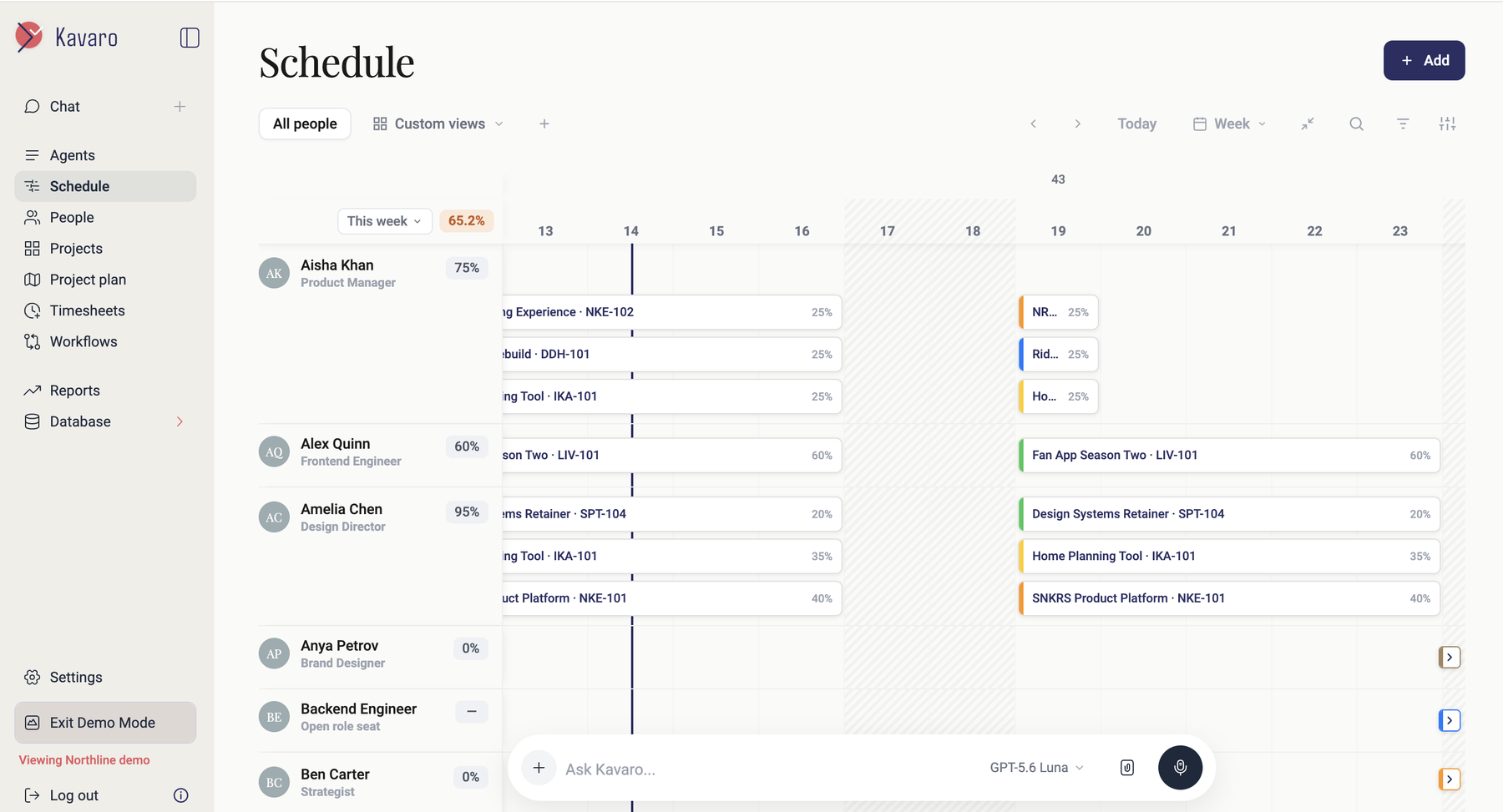
Side by side
| Kavaro | Paprika | |
|---|---|---|
| What it is | Resource management for agencies and consultancies | Agency management software: jobs, time, billing, purchasing, accounting |
| Price | $20/user/month billed annually | Not published (demo) |
| Trial | 30 days, no card | Demo ("a non-obligation run through") |
| Scheduling | Weekly schedule by person; confirmed, tentative, open roles, time off | Drag-and-drop calendar by day or period; over-allocation colour coding |
| Tentative / provisional bookings | Yes | Not mentioned on Paprika's resource-scheduling page |
| Utilisation | By person and project; weekly feed | Staff availability and utilisation reports |
| Schedule → timesheets | Timesheet suggestions from bookings | Scheduled work uploads into timesheets |
| Margin per booking (forward) | Yes, tentative revenue kept separate | Job costing (actuals) |
| Costed cover and hiring options | Yes | Not mentioned |
| Accounts, billing, purchasing, MTD | No | Yes ("compatible with Making Tax Digital and HMRC recognised") |
| Integrations | Slack, Jira, Trello, webhooks (Zapier, Make), Claude, ChatGPT | HubSpot CRM, Xero (per Capterra) |
| Deployment | Web app | Cloud and Windows on-premise (per Capterra) |
Pricing
Paprika doesn't publish prices. Book a demo for a quote. Kavaro's price is on the page:
| Team | Paprika | Kavaro ($20 billed annually) |
|---|---|---|
| 20-person agency | Quote | $400/month ($4,800 a year) |
| 60-person agency | Quote | $1,200/month ($14,400 a year) |
Paprika doesn't publish prices. Kavaro is $20 per user per month billed annually, in US dollars, before tax. If you're running both, add Kavaro's cost to your Paprika licence. You shouldn't be removing Paprika to make the numbers work.
When to keep Paprika
- Paprika runs your accounts, billing and job costing. Kavaro doesn't do any of that, so keep Paprika.
- MTD and HMRC recognition matter to your finance team.
- Your planning is simple. If you rarely carry tentative work or open roles, Paprika's scheduler and utilisation reports may be enough.
- You need on-premise. Capterra lists a Windows on-premise option for Paprika. Kavaro is a web app.
When to add Kavaro, or switch your scheduling to it
- Pitches and provisional work need to sit next to confirmed work without overwriting it.
- Your resource manager builds the forward plan outside Paprika in a spreadsheet each week.
- You want forward margin before you commit, not just actuals afterwards.
- You want costed cover options when a role has no one in it.
Running both: Kavaro doesn't integrate with Paprika today. Decide during the trial which tool holds timesheets, so nobody logs time twice. The worry we hear most about any change is "the lift and shift and double running and not losing something," so test that first.
Frequently asked questions
What is Paprika software?
Paprika is agency management software from Agency Software Worldwide. It covers clients and jobs, estimating, time and expenses, purchasing, client billing, resource scheduling, and finance and accounting, and says it is compatible with Making Tax Digital.
How much does Paprika cost?
Paprika doesn't publish prices. Its website offers a demo, and Capterra asks buyers to contact the vendor for pricing.
Does Paprika have resource scheduling?
Yes. Paprika's resource-scheduling module has a drag-and-drop calendar, over-allocation colour coding, availability and utilisation reports, and can send scheduled work into timesheets. Its page doesn't mention tentative or provisional bookings.
Can I use Kavaro with Paprika?
Yes, side by side: Paprika for jobs, billing and accounts, and Kavaro for forward resource planning and margin. There's no direct integration today, so agree which tool holds timesheets.
Is Kavaro a full replacement for Paprika?
No. Kavaro doesn't do accounting, billing or purchasing. It replaces or supplements Paprika's resource scheduling only.
Related: Agency resource management software · Creative agency software · Pricing